What is a Route Optimization Tool?
Route planning tools are programs and software that help sales reps optimize multi-stop route planning, which is the process of determining the best and most efficient route for a sales rep to visit multiple customer locations.
Route planning tools enable field sales reps to optimize their route to maximize productivity and minimize drive time.
A route optimization tool addresses common challenges that slow down outside sales revenue and productivity, including:
- Time-consuming manual tasks
- Data lag
- Traffic delays
- Schedule gaps
- Lack of territory/market insights
An advanced route planner app can save reps tons of time manually planning routes, which can then be put toward revenue-generating activities, like more facetime with customers. Using these tools, sales reps can avoid peak traffic times, take the most efficient route every time, and plan their travel days more effectively.
Why Using Google Maps for Route Optimization Won’t Cut It
If you’re new to route planning overall or have never heard of route optimization software, you may be thinking: but I have Google Maps on my phone. Why do I need another tool?
Google Maps is fantastic for personal use, but for outside sales reps mapping out complicated routes for customer visits, it doesn’t come close to the capabilities offered by route optimization software. When trying to use Google Maps for route optimization, it’s ultimately up to you to figure out the best route.
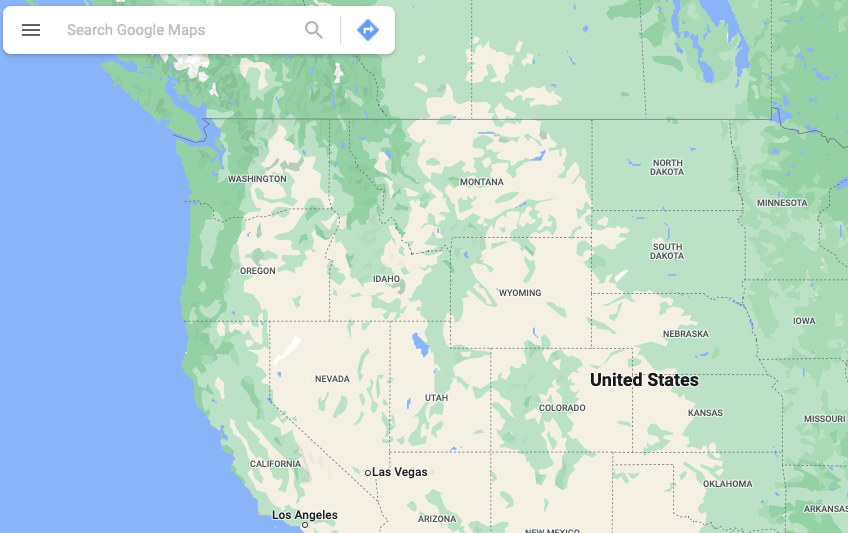
In Google Maps, multiple stops would need to be added manually, and it provides no record keeping with your CRM.
Google Maps can easily give you the best route just between Point A and Point B. But once you need to add in multiple stops, things get complicated and time-consuming pretty quickly. You would need to manually add each address, multiple times, to find the fastest route. And even then, you might be missing important factors, like not skipping prospects along the way and inputting vital information into your sales CRM.
Route optimization software uses advanced data technology and scenario modeling to make sure users get to their customers as quickly as possible, but with the least amount of miles driven, while also offering filtering and sorting options as well. Unlike Google Maps, many of these apps can integrate seamlessly with your CRM system and utilize sales automation activities like check-ins and notetaking. Not only can sales reps access client addresses while they plan their routes, but they can also capture, manage, and organize customer data on the fly in half the time.
Benefits of a Better Route Planner
The benefits of route optimization are extensive, and utilizing these tools can make a huge difference for any outside sales team. Here are some of the top benefits:
More Sales
This is what it’s all about, right? When sales pros have more efficient processes and more time, they have more time to sell.
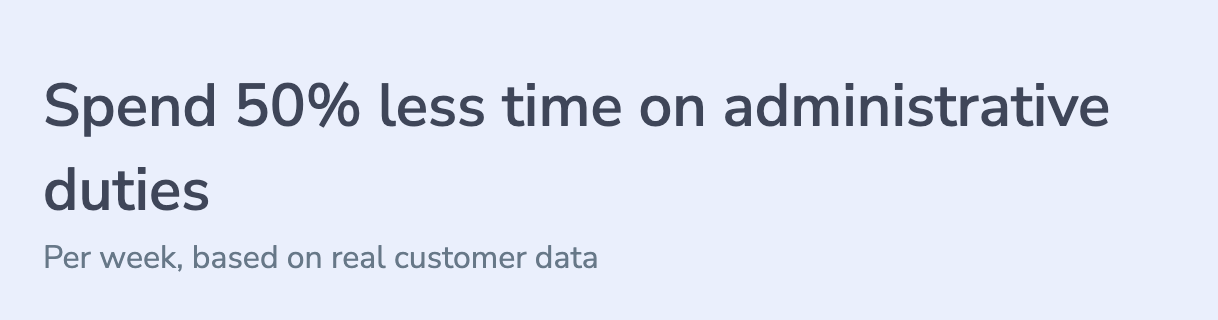
Using a route planning tool can cut your administrative time in half. A multi-stop route planner software will help automate and streamline the parts of a rep’s job not directly related to selling, enabling them to spend up to 50% less time on administrative activities. That frees them to focus on more productive sales activities like making calls, sending emails, and meeting with customers. Not only does route optimization empower a rep to be a better route planner and streamline sales trips, but it makes sure they get to their destinations as quickly as possible. Reps can cluster multiple client visits in a given region into one uber-productive day of work. Plus, some software can integrate with your CRM system, so they’re not wasting time searching for notes and client addresses.
Prioritize Major Accounts
The art of key account management, or the practice of identifying and prioritizing the customers you should be focusing most of your time on, is crucial for sales success. And route planning tools can help! Many of the route optimization software options allow you to place urgent or high profile clients at the top of your list and optimize your routes around visits that can’t wait.
Save Time, Save Money
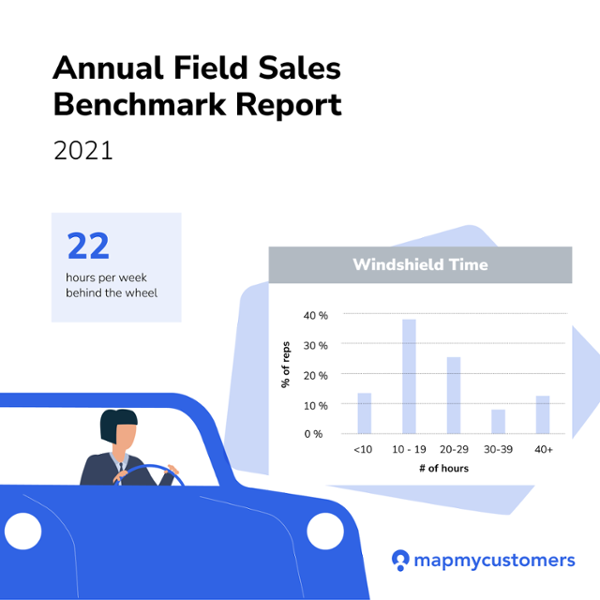
Field sales reps spend an average of 22 hours per week behind the wheel. What if that time could be reduced so you could spend more time selling?
On average, fully-dedicated outside sales reps spend 4.5 days every week in the field, and 22 hours behind the wheel. Just imagine what could be accomplished (and how much money could be saved) if even a percentage of those hours could be reallocated to actual selling! Route planner apps delegate the tedious and often stressful task of manually mapping routes and free that time up for more profitable activities. More efficient routes mean less driving or “windshield time.” Reps can take a smarter approach to sales planning, avoid peak traffic times, and take the fastest route every time. Also, if rising fuel costs are sinking your budget, more efficient routes can help you save a ton of money on gas.
Safeguard Against The Unexpected
Even with diligent planning, life happens. From severe weather to traffic restrictions to client emergencies, changes to major trips and appointment cancellations can throw a wrench in the most carefully scheduled sales routes. Sales route optimization tools can help sales reps bounce back from the unexpected. With all of their most important client data right at their fingertips, outside sales reps can revise their plans and come up with a new and improved agenda for the day.
Better Customer Experience and Improved Retention
Successful sales account management is largely based on solid long-term client relationships, which requires establishing yourself as a trusted advisor and understanding your client’s needs. Poor planning and disorganization can result in unproductive, delayed, or canceled meetings, and there’s no sure-fire way to damage a client relationship other than by wasting their time. A mobile-friendly sales optimization tool with CRM integration (like Map My Customers) helps ensure you always show up to meetings on time, firing on all cylinders, and are ready to demonstrate your value.
Multi-Stop Route Planning App Roundup
Now that you understand the benefits of a multi-stop route planner, it’s time to pinpoint the app that will meet the unique needs of your team and company. The best apps will help you optimize the task of mapping routes and integrate seamlessly with your organization’s current software and processes. Here are 10 options of route optimization tools to consider:
Map My Customers
Best for: B2B outside sales teams who are looking for a mobile-friendly all-in-one sales solution.
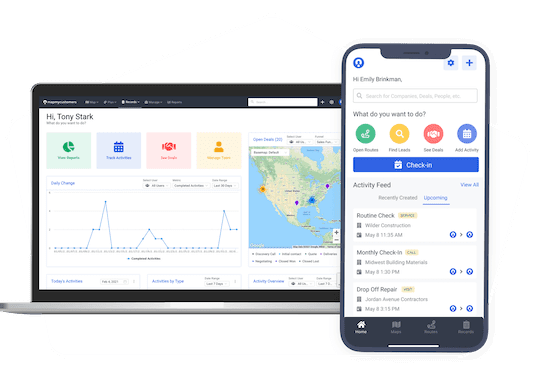
Map My Customers is a purpose-built, all-in-one B2B sales solution that optimizes field productivity and sales effectiveness for the entire team. Much more than just a simple route optimization software, the mobile-friendly platform provides sales mapping as well as robust workflow tools, in-depth reporting, and team management capabilities (great for sales reps and sales leaders!).
Map My Customers’ features include visualization and filtering of customers/prospects on a map, optimized multi-stop route planning, automated check-ins, quick logging of daily sales activities like calls and visits, and the ability to add new records and take notes wherever — even if reps are offline. The Smart Planner tool can give reps recommendations for activities to add to their calendar, like nearby accounts or customers who need follow-ups, preventing reps from having gaps in their workday and letting important accounts fall through the cracks. These daily agendas can then be turned into an optimized route with just a tap.
The Lead Finder feature within the platform enables reps to optimize their prospecting efforts like never before. They can search the map for new leads that may be near their current location, along their sales route, or near current customers that they are visiting that day. These new leads will show as pins on the map and can provide detailed business info in just a tap. They can then be easily imported into your account and synced back to your CRM.
The platform features robust reporting capabilities, including pipeline metrics that can be updated in real-time to show the latest deal statuses and a geographically-based revenue heat map. Sales leaders can also get the Weekly Scorecard sent straight to their email, which gives quick updates on their team’s latest sales performance and shows which team members may need more training/coaching.
Pros:
- Can show reps new opportunities on the same map as active leads, saving time on research and coordination
- Quick access to info for the entire sales team enables managers to coach from afar without micromanaging
- Offers much more in-depth reporting capabilities compared to other software options
- The customizable weekly email and Team Leaderboard quickly give managers key sales performance stats
- Mobile-friendly design makes all critical data accessible in one place, in the office and on the road
Cons:
- Because it was purpose-built for field sales, inside sales teams may not find as much value from the features
Pricing: Personal = $60/month per user, billed monthly. Team = $105/month per user, billed monthly.
CRM Integrations: Salesforce, HubSpot, Zoho, Microsoft Dynamics
Spotio
Best for: Sales teams selling door-to-door to residential consumers.
Spotio is a sales engagement and sales mapping software built with door-to-door sales teams in mind. The platform helps reps optimize sales effectiveness while out in the field. Spotio also helps sales leaders more efficiently manage territories and keep track of their teams by housing all sales activity in one central location.
Pros:
- User-friendly and straightforward interface, especially the mobile app
- Easy visualization of sales activities and performance with real-time updates
- Reps can sequence and easily plan sales activities for each customer/prospect
Cons:
- Built for door-to-door sales, not as good a fit for B2B sales teams
- Does not have as many team management and territory management functionalities
- Limited customization of functionalities/fields within the platform
Pricing: Four plans available (Team, Business, Pro, Enterprise). Plans start at $195/month. All plans billed annually with a one-time implementation fee.
CRM Integrations: HubSpot, Salesforce, Zoho, Microsoft Dynamics (via native integration, open API, or Zapier)
SalesRabbit
Best for: Door-to-door B2C sales teams that want a mapping tool with basic sales insights.
For business-to-consumer sales teams who are selling door-to-door, SalesRabbit is another good option. This platform can help make the best use of your team’s CRM data when out in the field while also syncing SalesRabbit data back to the CRM.
Pros:
- Quick and easy data access in a user-friendly interface
- Colored pins on the map for quick visit status identification
- Sales managers can monitor team activities in real-time
- DataGrid add-on enables lead qualification with homeowner info before knocking
Cons:
- Built for door-to-door residential sales, may not fit B2B teams
- Limited note-taking capability in the field
- Does not offer in-depth reporting and sales insight capabilities
- Limited map interface filter options
- May require Zapier subscription for CRM integration
- One-time setup fee required
Pricing: Team (3 user min) = $25/month per user. Pro (10 user min) = $35/month per user. Enterprise (100 user min) = $59/month per user. Setup fees range from $399 to $4,999.
CRM Integrations: Salesforce (one-way), HubSpot via Zapier, Microsoft Dynamics 365, Copper via Zapier
Repsly
Best for: Small to medium-sized retail sales and merchandising teams.
Repsly is a retail execution platform that helps optimize the effectiveness of merchandising and field sales teams. For both brands and wholesalers, Repsly gives teams the data and tools they need to make the largest impact in the field every day.
Pros:
- Streamlined and user-friendly platform
- Easy identification and prioritization of high-opportunity accounts
- Real-time coaching through direct messaging
- Flexible scheduling with on-the-fly route changes
Cons:
- No desktop route mapping, must be done from mobile app
- Limited optimized team management for large teams
- Quickly drains phone/tablet battery
Pricing: Four plans (Essentials, Pro+, Premium, Enterprise). Contact Repsly for pricing. Optional add-ons available.
CRM Integrations: Salesforce, Dynamics 365, Xero
Mapsly
Best for: On-the-go outside sales reps who want a light, easy-to-use mapping solution.
For field sales reps who simply want a light and purely mobile mapping solution that offers some basic sales automation capabilities, Mapsly is a solid choice.
Pros:
- User-friendly application with streamlined onboarding
- Large variety of map filters for data customization
- Configurable user profiles for access control
- Supports truck fleet route optimization
Cons:
- Limited sales planning capabilities beyond route planning
- Less in-depth reporting (no pipeline/deal visualization)
- Limited sales team management capabilities
Pricing: Essential = $25/month per user. Pro = $45/month per user. Enterprise = $70/month per user. 14-day free trial available.
CRM Integrations: HubSpot, Zoho CRM, Salesforce, Microsoft Dynamics 365, Pipedrive, Zendesk Sell
Geopointe
Best for: Salesforce CRM users who want more economic territory mapping software.
Geopointe is a geo-mapping app that helps sales teams use location data to improve their effectiveness and boost results. This software helps reps plan routes by location-enabling your Salesforce CRM data.
Pros:
- Powerful route planning and visualization features
- Check in/out capability with field note logging
- Email and chat support
- Free trial/demo available
Cons:
- Not a stand-alone solution; requires Salesforce CRM integration
- Limited advanced data filtering capabilities
- Steep learning curve for new reps
- Limited reporting features
Pricing: Annual Plan = $60/month per user, billed annually. Enterprise = Contact for pricing.
CRM Integrations: Salesforce only
Skynamo
Best for: Wholesale, manufacturing, and distribution sales teams wanting to automate route planning and admin duties.
Skynamo’s mobile sales app helps automate time-consuming tasks like route planning, minimizes manual data entry, and cuts out excessive admin duties so field sales reps can spend more time selling.
Pros:
- Helps reps spend less time on admin work (call/visit reports in minutes)
- Instant access to customer order history from any mobile device
- Quick and easy access to customer details, notes, and past communications
- Full offline functionality with sync when back online
Cons:
- Less comprehensive reporting than some alternatives
- Not as customizable as other route optimization tools
- Steep learning curve for non-tech-savvy users
- Battery drain on mobile devices
Pricing: Custom pricing based on number of users, features, and integrations. Contact Skynamo for a quote.
CRM Integrations: Microsoft Dynamics 365, Xero, plus popular ERP and accounting software
Mapline
Best for: Teams who want basic mapping software to map Excel data and optimize logistics.
Mapline is a web-based basic mapping and routing solution that small to medium-sized distribution and sales teams can utilize. Users can import data from Excel and create a map in seconds.
Pros:
- Easy visualization of line-item customer data geographically
- Maps created by city, zip code, and state
- Routing features meet truck fleet needs
Cons:
- Web-based desktop only, not mobile-friendly
- Lacks geospatial features of other mapping options
- More of a fleet management tool than field sales software
Pricing: Free starter version with limited capabilities. Contact Mapline for paid version pricing.
CRM Integrations: None (built for Excel-based data management)
Geomapper
Best for: Sales teams using HubSpot CRM who want geographic mapping.
GeoMapper is a HubSpot integration that offers data visualization for sales teams from businesses and enterprises of all sizes. This mapping tool enables your team to map HubSpot sales data with ease, all without having to leave your CRM.
Pros:
- Direct HubSpot integration with no outside app needed
- Create specific lists by region or funnel stage
- Free option available for evaluation
Cons:
- Lean mapping software lacking additional capabilities beyond simple maps
- No sales routing features for road efficiency
- Only works within HubSpot
- Gets expensive as contact numbers grow
Pricing: Free plan (up to 100 contacts). Basic 5K = $52/month (annual) or $65/month (monthly). Pro 10K = $72/month (annual). Pro 25K = $112/month (annual). Pro 50K = $144/month (annual).
CRM Integrations: HubSpot only
Route Optimization Software Addresses Outside Sales Teams’ Top Challenges
Time and information are two of the most valuable commodities for outside sales teams. When there’s not enough, sales reps struggle to accomplish goals. With more of both, you can make better decisions, be a better route planner, and do more of the sales activities that move the needle. The right route optimization tool can give both reps and sales leaders a deeper understanding of their territories, help manage them more effectively, and supercharge reps’ productivity. Try out one of the above multi-stop route planner tools today and start optimizing your field sales team’s success!