What Is Salesforce Maps Exactly?
MapAnything, a location intelligence tool, was acquired by Salesforce in early 2019 and rebranded as Salesforce Maps in August 2019. This merger combined MapAnything’s geo-spatial capabilities with Salesforce’s robust sales CRM platform.
Salesforce Maps is a location-based intelligence tool, accessible on mobile devices and built for global enterprise-level teams, designed to help optimize sales processes and territory management. Following Salesforce’s rebrand of Sales Cloud to Agentforce Sales at Dreamforce ‘25 (September 2025), Maps now sits within the Agentforce Sales product umbrella, though the Maps product itself was not renamed.
Top Features:
- Visualize and manage sales territories by dividing them using Salesforce CRM data (geography, customers, revenue, sales type)
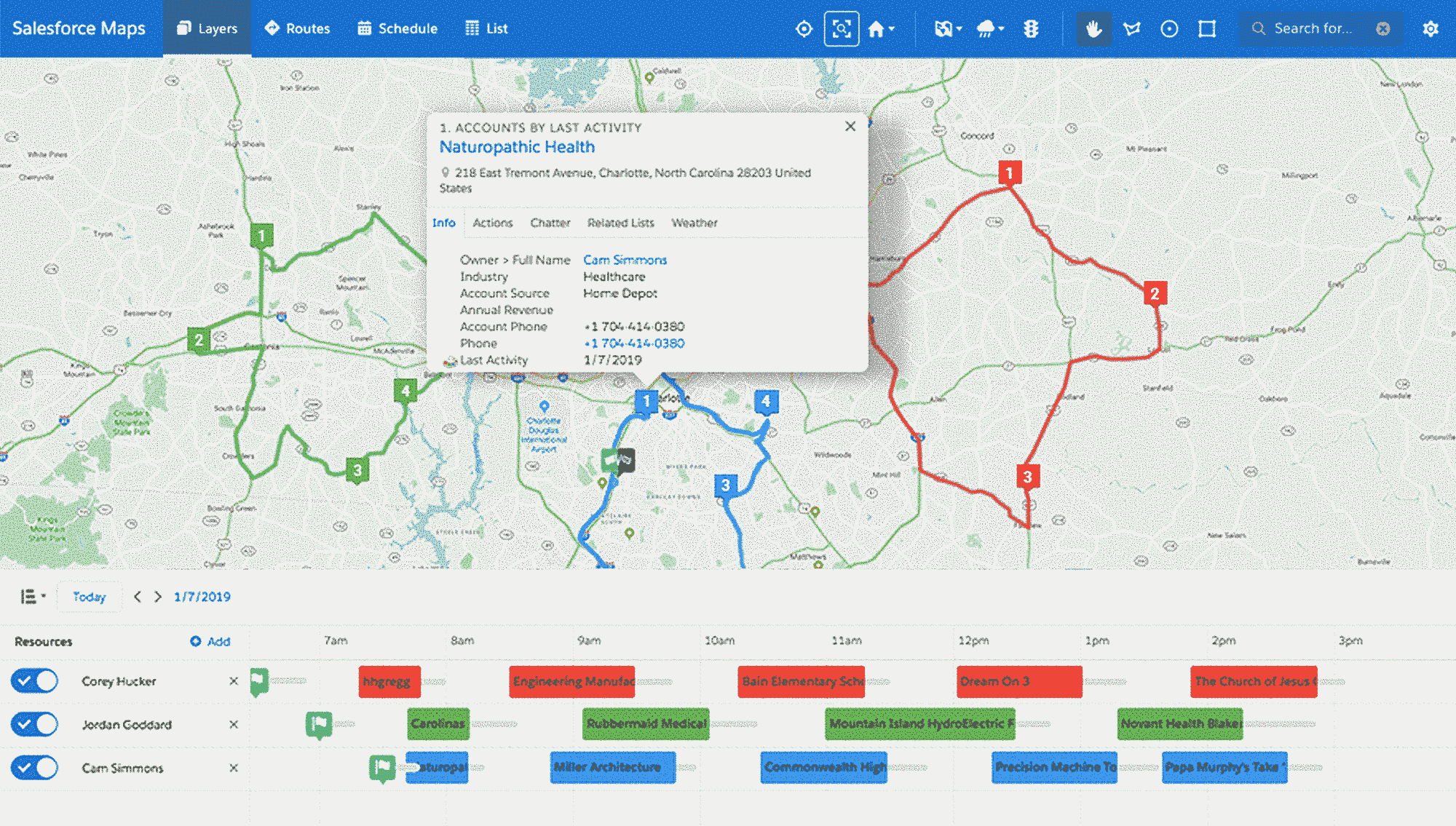
- Visualize sales data on a map-based interface showing revenue, rep activity, and metrics within territories
- Create optimized sales routes for the fastest, most efficient customer visits
- Find nearby accounts on the map to fill scheduling gaps
- Prioritize prospect visits using Einstein or Pardot Score (7-day scheduling)
- Share and collaborate via exchange-based calendars and maps on desktop/mobile
If you are new to the concept of sales mapping in general, start with our complete guide to understand the different map types and how field sales teams use them before diving into a specific tool review.
Salesforce Maps Pricing
Salesforce Maps requires a Salesforce CRM subscription ($25-$300/month per user depending on edition). The mapping tool itself offers two pricing tiers:
Maps (Base): $75/month per user (annual billing)
- Sales route optimization and scheduling
- Salesforce CRM data visualization
- Auto-assignment of leads by location
- Mobile access (note: standalone mobile app retiring August 31, 2026; see below)
Maps Advanced: $150/month per user (annual billing)
- Everything in Base, plus:
- Advanced priority scheduling based on business rules
- Thematic mapping and territory layers with data trends
- Extended route planning beyond one week
Maps can also be purchased as part of the SPM (Sales Performance Management) Product Suite or the Agentforce 1 Sales Edition bundle.
What Does Salesforce Maps Actually Cost?
The list price is only part of the picture. Because Salesforce Maps requires a Salesforce CRM license, the true per-user cost is significantly higher than what appears on the pricing page:
| Scenario | Monthly cost per user |
|---|---|
| Maps Base + Sales Cloud Essentials | ~$100/user/month |
| Maps Base + Sales Cloud Professional | ~$155/user/month |
| Maps Advanced + Sales Cloud Enterprise | ~$315/user/month |
| Maps Advanced + Sales Cloud Unlimited | ~$450/user/month |
For a 10-rep team on Sales Cloud Professional with Maps Base, you are looking at roughly $18,600/year before implementation, training, or admin overhead. Teams that do not already run Salesforce face an even steeper cost to adopt the full ecosystem just to access the mapping features.
Pros and Cons Of Salesforce Maps
Pros
- Multi-dimensional sales data visualization on map interface
- Balanced territory creation enabling consistent rep performance
- Comprehensive dashboards with check-ins, site time, opportunities data
- Optimized routes displaying distance and travel time
- Mobile accessibility for field updates and customer discovery
- Direct Salesforce CRM integration ensuring data consistency
- Enterprise-grade security and compliance inherited from the Salesforce platform
Cons
- Limited functionality compared to competitors; lacks deals tracking for pipeline visibility
- Standalone mobile app being retired August 31, 2026, forcing migration to the standard Salesforce mobile app
- Difficult route adjustments for cancellations or special cases
- Minimal demographic data alongside geographic information
- Extended setup and customization timeline (weeks to months for enterprise deployments)
- Steep learning curve, especially for sales reps new to Salesforce
- High customization complexity throughout platform
- Premium pricing relative to alternative solutions, particularly for non-enterprise teams
- No standalone option: teams must adopt the full Salesforce ecosystem
August 31, 2026: Salesforce Maps Mobile Retirements
Salesforce has announced two significant retirements taking effect on August 31, 2026:
Standalone Salesforce Maps mobile app: The app will be removed from the Apple App Store and Google Play on this date. After removal, Salesforce will provide no support, updates, or security patches for the app. Teams still using it must migrate to the Maps experience within the standard Salesforce mobile app before the deadline.
Salesforce Maps Live Tracking Mobile subscriptions: These subscriptions are also retiring on August 31, 2026. After that date, reps will no longer be able to generate new geolocation data through Live Tracking Mobile. Salesforce recommends Check-In and Mileage Administration within core Maps as alternatives for tracking field rep location and activity.
If your team depends on either the standalone app or Live Tracking Mobile, migration planning should be underway now. This retirement is prompting many field sales teams to evaluate alternatives that offer dedicated, full-featured mobile apps without the risk of future deprecation.
What Salesforce Maps Users Actually Think (G2 Reviews)
Salesforce Maps holds a 4.2 out of 5 rating on G2 (341 reviews) as of mid-2026. The review pattern is consistent with what you would expect from an enterprise-grade, Salesforce-native tool:
What users like:
- Route optimization and territory visualization at enterprise scale
- Deep integration with Salesforce CRM data for real-time territory intelligence
- Familiar Salesforce UI for teams already embedded in the ecosystem
Common complaints:
- Pricing relative to value: cost adds up quickly when layered on top of existing Salesforce licensing
- Steep learning curve for new reps, with training timelines measured in weeks rather than days
- Poor support quality for the price point
- Slow performance with large datasets, particularly when loading complex territory views
- Limited pipeline management compared to purpose-built field sales tools
Map My Customers vs. Salesforce Maps: Head-to-Head Comparison
If you are evaluating Salesforce Maps, chances are you are also comparing it against purpose-built field sales tools. Here is how Map My Customers stacks up:
| Feature | Map My Customers | Salesforce Maps |
|---|---|---|
| Starting price | Custom pricing | $75/user/month (+ Salesforce license) |
| CRM dependency | Standalone, or integrates with Salesforce, HubSpot, Zoho, Dynamics | Requires Salesforce CRM |
| Dedicated mobile app | Yes, native iOS and Android | Standalone app retiring Aug 31, 2026 |
| Route optimization | Yes, with multi-stop and advanced routing | Yes, basic and advanced tiers |
| Pipeline/deals tracking | Built-in pipeline management with visual deal stages | Limited; relies on Salesforce Opportunities |
| Territory management | Yes, with drag-and-drop boundaries | Yes, with CRM data-driven boundaries |
| Lead Finder | Built-in prospecting tool | Not included; requires separate tools |
| Setup time | Hours to days | Weeks to months |
| Ideal for | SMB to mid-market field sales teams, multi-CRM environments | Enterprise teams already on Salesforce |
The key difference: Map My Customers is built from the ground up for field sales teams and works regardless of which CRM you use. Salesforce Maps is a powerful add-on, but it locks you into the Salesforce ecosystem and carries significant additional cost.
For teams looking to optimize their daily routes specifically, our route planner comparison guide breaks down the top options across price, features, and mobile experience.
How To Add Mapping To Your Salesforce CRM
Installation occurs through the Salesforce AppExchange. After purchase, the package functions as a trial for 72 hours. Proper configuration is essential for team adoption. Salesforce provides an in-depth video series that will walk you through the initial configuration setup.
The setup process typically involves:
- Installing the managed package from AppExchange
- Configuring object permissions and field-level security
- Setting up geocoding for your account and contact addresses
- Defining territory boundaries and assignment rules
- Training your team on the map interface, route planning, and mobile workflows
For teams with hundreds or thousands of accounts, expect the full configuration and rollout process to take several weeks. Larger enterprises with complex territory hierarchies may need a Salesforce implementation partner.
Alternatively, Map My Customers allows for seamless syncing between the two platforms, keeping your sales data clean and consistent. This gives teams the option to use a purpose-built field sales tool on top of their existing Salesforce data without replacing their CRM.
Utilizing Mapping Tools To Optimize Your Salesforce
When selecting mapping solutions, prioritize functionality that meets rep field needs, CRM compatibility, and ROI through productivity improvements. Ease-of-use for mobile users proves critical to implementation success.
Key questions to ask when evaluating any sales mapping tool:
- Does it work with my CRM? Salesforce Maps only works with Salesforce. If your team runs HubSpot, Zoho, or Dynamics, you need an alternative.
- How fast can reps get started? Complex setup timelines kill adoption. Look for tools that deliver value in the first week, not the first quarter.
- Is the mobile experience truly field-ready? Reps need offline access, one-handed operation, and fast load times. A desktop app crammed into a mobile browser does not count.
- Does it include pipeline tracking? Route optimization is valuable, but knowing which deals are moving (and which are stalling) while you are in the field is what drives revenue.
- What happens when your team grows? Pricing that works for 5 reps can become prohibitive at 50. Understand the total cost at scale before committing.
For a deeper look at territory management strategy and best practices, our definitive guide covers everything from territory design to rebalancing frameworks.