What Is Salesforce Maps Exactly?
MapAnything, a location intelligence tool, was acquired by Salesforce in early 2019 and rebranded as Salesforce Maps in August 2019. This merger combined MapAnything’s geo-spatial capabilities with Salesforce’s robust sales CRM platform.
Salesforce Maps is a location-based intelligence tool, accessible on mobile devices and built for global enterprise-level teams, designed to help optimize sales processes and optimize territory management.
Top Features:
- Visualize and manage sales territories by dividing them using Salesforce CRM data (geography, customers, revenue, sales type)
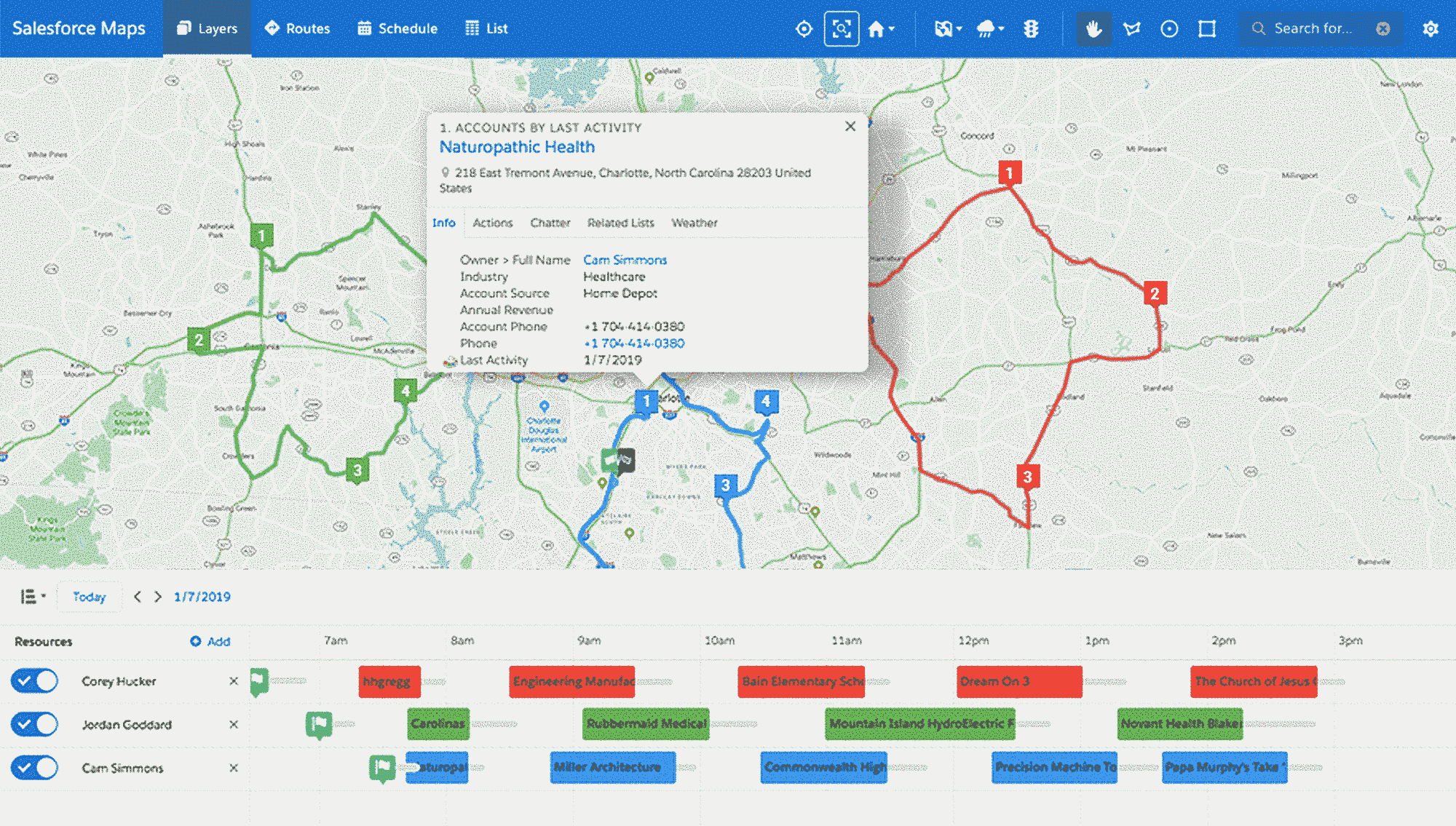
- Visualize sales data on map-based interface showing revenue, rep activity, and metrics within territories
- Create optimized sales routes for fastest, most efficient customer visits
- Find nearby accounts on the map to fill scheduling gaps
- Prioritize prospect visits using Einstein or Pardot Score (7-day scheduling)
- Share and collaborate via exchange-based calendars and maps on desktop/mobile
Salesforce Maps Pricing
Salesforce Maps requires a Professional Sales Cloud subscription or higher ($75-$300/month per user). The mapping tool itself offers two pricing tiers:
Basic Version: $75/month per user (annual billing)
- Sales route optimization and scheduling
- Salesforce CRM data visualization
- Auto-assignment of leads by location
- Mobile access
Advanced Version: $125/month per user (annual billing)
- Everything in Basic, plus:
- Advanced priority scheduling based on business rules
- Thematic mapping and territory layers with data trends
- Extended route planning beyond one week
Pros and Cons Of Salesforce Maps
Pros
- Multi-dimensional sales data visualization on map interface
- Balanced territory creation enabling consistent rep performance
- Comprehensive dashboards with check-ins, site time, opportunities data
- Optimized routes displaying distance and travel time
- Mobile accessibility for field updates and customer discovery
- Direct Salesforce CRM integration ensuring data consistency
Cons
- Limited functionality compared to competitors; lacks deals tracking for pipeline visibility
- Mobile app capabilities lag desktop version significantly
- Difficult route adjustments for cancellations or special cases
- Minimal demographic data alongside geographic information
- Extended setup and customization timeline
- Steep learning curve, especially for sales reps
- High customization complexity throughout platform
- Premium pricing relative to alternative solutions
How To Add Mapping To Your Salesforce CRM
Installation occurs through the Salesforce AppExchange. After purchase, the package functions as a trial for 72 hours. Proper configuration is essential for team adoption. Salesforce provides an in-depth video series that will walk you through the initial configuration setup.
Alternatively, Map My Customers allows for seamless syncing between the two platforms, keeping your sales data clean and consistent.
Utilizing Mapping Tools To Optimize Your Salesforce
When selecting mapping solutions, prioritize functionality meeting rep field needs, CRM compatibility, and ROI through productivity improvements. Ease-of-use for mobile users proves critical to implementation success.