What is GeoMapper?
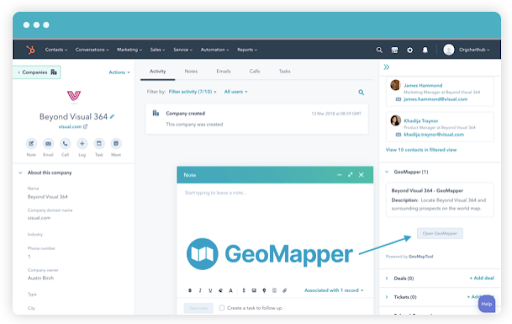
GeoMapper is a HubSpot integration providing data visualization for businesses and enterprises. This mapping tool operates within HubSpot without requiring users to leave their CRM platform. The software takes companies and contacts from HubSpot and displays them on a map.
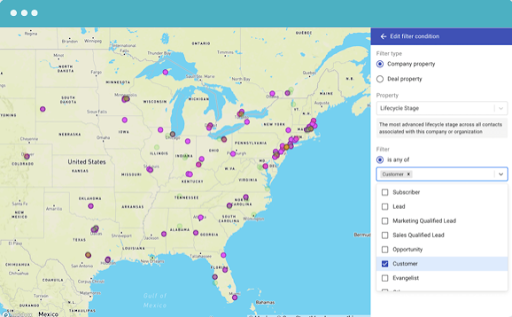
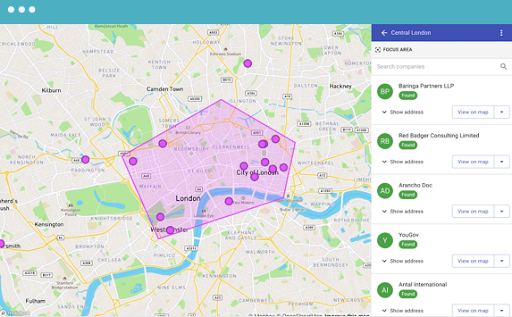
Key capabilities include creating filtered lists to identify where contacts exist in the sales funnel, using sketch functions to target specific geographic areas, and importing these lists back into HubSpot. Beyond sales applications, marketing teams can leverage GeoMapper for localized campaigns and events, while customer service can use it to invite relevant customers to local activities.
GeoMapper Pricing
GeoMapper requires an active HubSpot CRM (free basic plan available). The mapping tool offers multiple tiers:
| Plan | Contacts | Annual Price | Monthly Price |
|---|---|---|---|
| Starter | Up to 100 | Free | Free |
| Basic 5K | Up to 5,000 | $52/mo | $65/mo |
| Pro 10K | Up to 10,000 | $72/mo | $90/mo |
| Pro 25K | Up to 25,000 | $112/mo | $140/mo |
| Pro 50K | Up to 50,000 | $144/mo | $180/mo |
All packages provide unrestricted seats, unrestricted lists created, and sketch functionality with export to HubSpot Lists.
Pros and Cons of GeoMapper
Pros
- Seamless Integration: As a HubSpot integration, users access mapping features without opening separate applications, streamlining list importing and information access.
- Strategic Visualization: Create region-specific lists and funnel-stage tracking to facilitate informed strategy and easier information visualization.
- Affordable Entry Point: The free option enables new businesses to evaluate mapping effectiveness before financial commitment.
- Scalable Pricing: Organizations choose contact levels matching actual needs, avoiding unnecessary expenses.
- Cross-Department Collaboration: The mapping feature supports multiple departments, preventing information silos and enabling seamless marketing-sales collaboration.
Cons
- Limited Functionality: GeoMapper provides basic mapping only; additional capabilities require supplementary software solutions.
- HubSpot-Only Compatibility: The tool works exclusively with HubSpot CRM and won’t function with alternative platforms.
- Escalating Costs: Expanding contact limits becomes progressively expensive for growing organizations.
- No Route Optimization: It lacks any routing features to help make trips efficient. Users view customers geographically but cannot access optimal routing.
- No Sales Rep Tracking: Leadership cannot monitor field representative locations or daily activities through the application.
- Limited Sales Enablement: The platform lacks built-in sales enablement; reps must manually enter information elsewhere.
- Oversimplified for Some: Companies requiring comprehensive sales support may find GeoMapper insufficiently robust.
How to Add GeoMapper to Your HubSpot CRM
GeoMapper provides straightforward installation instructions through their Setup Guide featuring step-by-step directions with embedded links for simultaneous reference. For visual learners, an onboarding video demonstrates the setup process. Users should carefully select their HubSpot account if managing multiple instances before beginning installation.
Alternatives to GeoMapper
Map My Customers
Sales mapping plus workflow tools for reps and reporting for leaders
Map My Customers now offers HubSpot integration, enabling sales teams to visualize company, contact, deal, and activity records as map pins with grouping and color-coding options. Beyond GeoMapper’s basic mapping, this all-in-one platform includes:
- Sales enablement tools reducing data entry time
- Optimized routing functionality
- Automatic activity logging (visits, calls)
- Offline note-taking capabilities
- Mobile app access
- Lead Finder feature: Reps can search the map for new leads that may be near their current location, along their sales route, or near current customers that they are visiting that day.
- Smart Planner functionality: Provides intelligent recommendations for building daily/weekly plans with one-tap route optimization
- Weekly Scorecard: Updates leaders on team sales performance via email
- Team Leaderboard for performance visibility
Pricing: $60/month personal; $70/month per team user. Free trial available.
Spotio
Sales mapping for door-to-door sales
Spotio integrates with HubSpot, offering real-time door-knock logging with GPS location tracking. Features include territory visibility, deal tracking, and pitch storage for sales preparation.
Pricing: Team=$39/month per user; Business=$69/month per user; Pro=$129/month per user. Free trial available.
Mapsly
A lighter solution for mapping on the go
As a geo-intelligence platform, Mapsly offers customizable mapping, route optimization, visit planning, territory management, and no-code automation. Native HubSpot API integration enables mass updates and auto-assignment of territories.
Pricing: Essential=$25/month per user; Pro=$45/month per user; Enterprise=$70/month per user. Free trial available.
Mapping Tools for a More Effective Sales Team
Selecting appropriate territory mapping and data visualization software remains essential for outside sales teams, providing vital insights and improving planning effectiveness. Multiple tools integrate seamlessly with HubSpot CRM, accommodating varying team sizes, requirements, and budgets. Leadership should carefully analyze all available options before investing in new technology to ensure optimal tool selection.