
If you’ve been searching for “Microsoft MapPoint 2022” or “MapPoint download,” you’re not alone. Thousands of sales professionals relied on MapPoint for years to visualize customers on a map, plan routes, and manage territories. But Microsoft officially discontinued MapPoint back in 2014, and finding a modern replacement can feel overwhelming.
The good news: the tools available today are far more powerful than MapPoint ever was. In this guide, we’ll walk through the history of MapPoint, why it was discontinued, and how Map My Customers delivers everything MapPoint offered (and much more) in a cloud-based, mobile-first platform built for today’s field sales teams.
A Brief History of Microsoft MapPoint
MapPoint’s roots go back to 1988, when a small software company called NextBase developed a mapping application called Autoroute. Microsoft acquired the technology and eventually launched MapPoint in 2000 as a desktop mapping and territory visualization tool for business professionals.
For its time, MapPoint was genuinely impressive. Sales teams could import spreadsheets of customer data, plot those customers on a map, draw territories, and calculate driving routes between stops. It integrated with Microsoft Office, so you could embed maps directly into PowerPoint presentations or Excel workbooks.
MapPoint went through several versions over the years, with MapPoint 2013 being the final release. Microsoft announced the end of life in 2014, and support officially ended shortly after.
What MapPoint Could Do
At its core, MapPoint offered a handful of key features that made it popular with field sales teams:
- Data visualization on maps. Users could import customer lists from Excel or Access and see pins on a map, color-coded by revenue, territory, or custom fields.
- Route planning. MapPoint could calculate driving directions between multiple stops, though the routing was basic by today’s standards.
- Territory drawing. Sales managers could draw boundaries on the map to define territories and assign reps.
- Demographic overlays. The software included census data layers for basic market analysis.
- Office integration. Maps could be exported to Word, Excel, and PowerPoint.
These features made MapPoint a staple for outside sales teams throughout the 2000s. But the world changed, and MapPoint didn’t keep up.
Why Microsoft Discontinued MapPoint
Microsoft pulled the plug on MapPoint for several reasons. First, the rise of Bing Maps and Google Maps made standalone desktop mapping software feel redundant. Why install a separate application when you could get directions from your browser?
Second, the explosion of smartphones and GPS navigation changed how people planned routes. By 2014, nearly every sales rep had a smartphone with turn-by-turn navigation built in. A desktop mapping tool you had to install from a CD felt like a relic.
Third, Microsoft was shifting its strategy toward cloud-based services. The company was investing heavily in Office 365, Azure, and Dynamics CRM. A standalone desktop mapping tool didn’t fit the vision.
Finally, MapPoint’s data was static. You bought a version with a snapshot of road data, and it never updated until you purchased the next version. In a world of real-time traffic, live mapping, and always-current data, that model was unsustainable.
Can You Still Use MapPoint Today?
Technically, you might be able to find old installation files floating around the internet, but there are major problems with trying to run MapPoint in 2024 or beyond:
- No support for modern Windows. MapPoint was built for Windows 7 and earlier. It does not run reliably on Windows 10 or 11, and Microsoft provides no patches or compatibility updates.
- Outdated map data. The road and address data in MapPoint is over a decade old. New highways, changed addresses, and updated zip codes simply don’t exist in the software.
- No mobile access. MapPoint was desktop-only. There is no way to use it on your phone while you’re in the field.
- No CRM integration. Modern sales workflows depend on live CRM data. MapPoint can’t connect to Salesforce, HubSpot, or any other modern CRM.
- Security risks. Running unsupported software on your business network creates vulnerabilities that no IT team should accept.
The bottom line: MapPoint is not a viable option for any sales team today. You need a modern alternative.
Map My Customers: The Modern MapPoint Replacement
Map My Customers was built specifically for field sales teams who need to visualize customers, plan routes, manage territories, and track activities, all from a single platform that works on desktop and mobile. Here’s how it covers every capability MapPoint offered, plus the features today’s sales organizations demand.
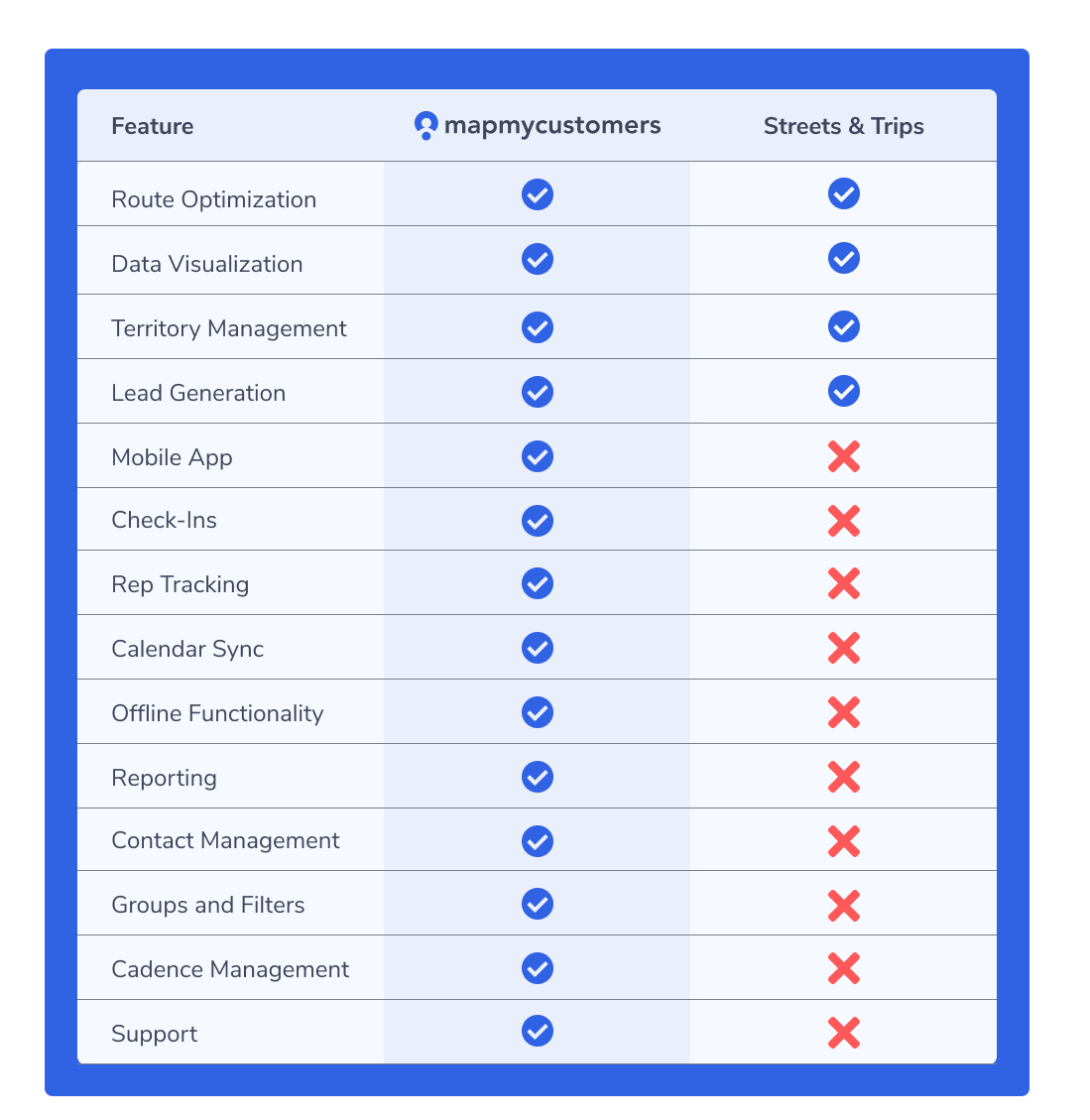
1. Customer Visualization
MapPoint let you plot customer pins on a map. Map My Customers takes that concept and supercharges it with a modern, map-based CRM that puts your entire customer database on an interactive map.
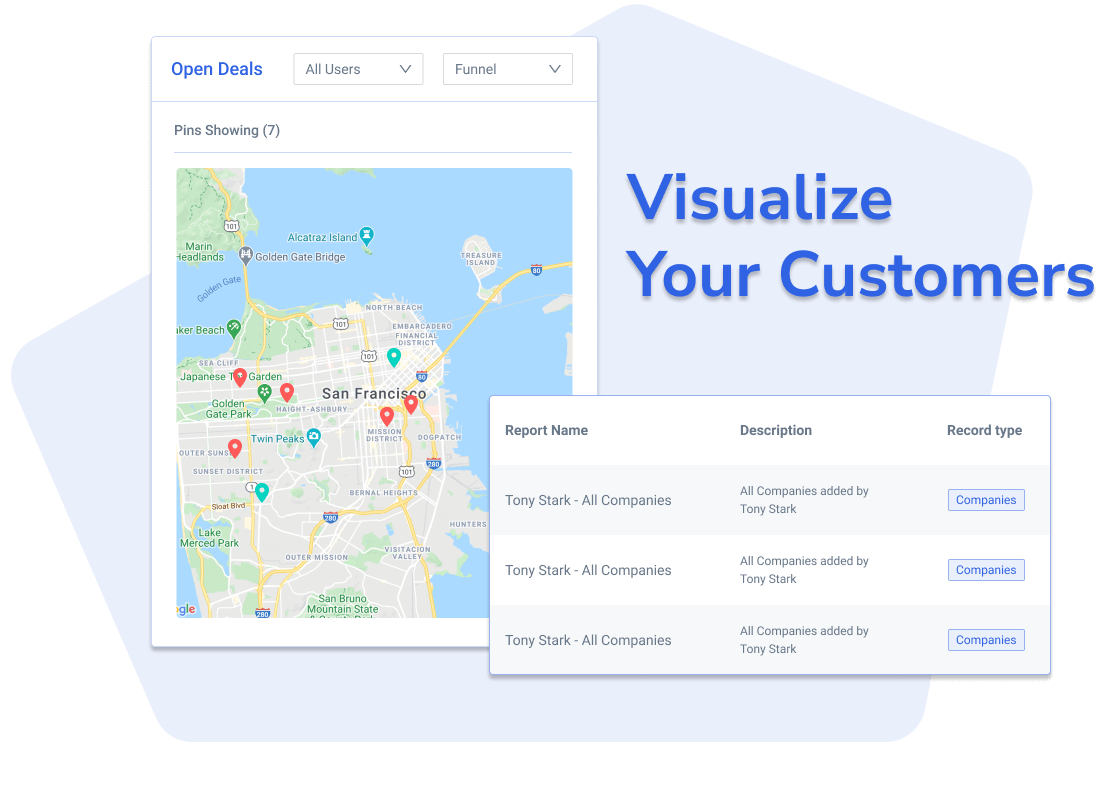
With Map My Customers, you can filter and segment your map view by any field in your CRM, whether that’s deal stage, revenue tier, last contact date, or custom fields you define. Color-coded pins make it instantly clear which accounts need attention, which deals are closing soon, and where your whitespace opportunities are.
Unlike MapPoint’s static data imports, Map My Customers syncs bidirectionally with your CRM in real time. When a rep updates a deal in Salesforce, the map updates automatically. When a rep logs a visit from the mobile app, it syncs back to the CRM within minutes.
You can also create custom map layers and overlays to visualize data in ways that MapPoint never could. Heat maps show you where your revenue is concentrated. Radius searches help you find nearby prospects when a meeting cancels. Lasso select lets you grab a group of accounts and take action on them in bulk.
2. Route Optimization
MapPoint’s route planning was functional but limited. You could enter a list of stops and get basic driving directions, but there was no optimization, no consideration for time windows, and no mobile navigation.
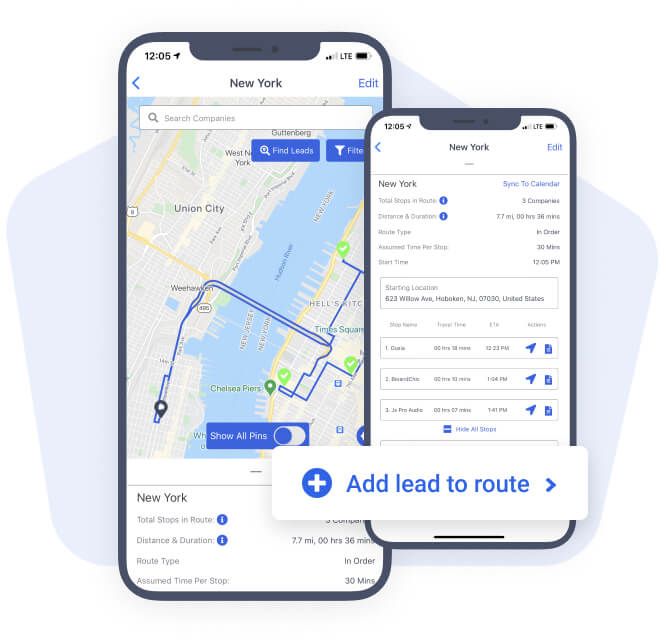
Map My Customers features a powerful multi-stop route optimizer that calculates the fastest sequence of stops, accounting for real-time traffic, drive times, and your daily schedule. The Smart Planner feature goes even further by automatically suggesting which accounts to visit based on criteria you set, like accounts that haven’t been visited in 30 days, deals closing this quarter, or high-value prospects in a specific territory.
Routes sync to your mobile device, so you can navigate stop-by-stop using your phone’s GPS. After each visit, you can log your activity, add notes, and schedule follow-ups without leaving the app. At the end of the day, your manager has full visibility into where you went and what you accomplished.
3. Sales Planning and Contact Management
MapPoint was a mapping tool, not a CRM. It couldn’t store notes, log calls, or track follow-up tasks. For that, you needed a completely separate system.
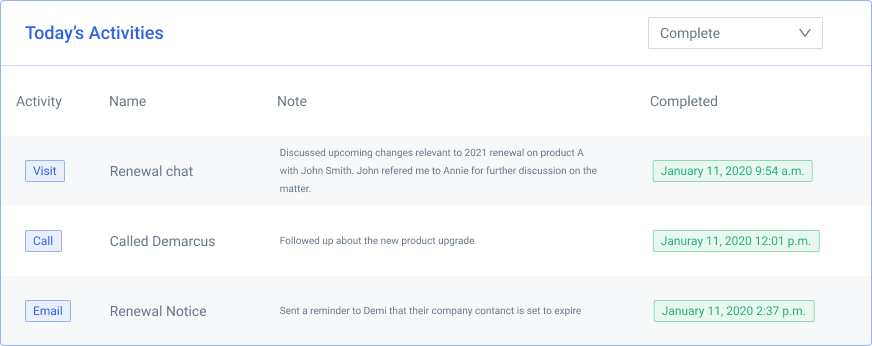
Map My Customers bridges the gap between mapping and CRM by combining both into a single workflow. Reps can log calls, visits, emails, and meetings directly from the map or mobile app. Every interaction is automatically tied to the account record and synced to your CRM of record.
The activity feed gives reps a clear view of their recent interactions, upcoming tasks, and overdue follow-ups. Managers can see team-wide activity in a single dashboard, making it easy to spot coaching opportunities and ensure no accounts are slipping through the cracks.
Built-in contact management means you can store multiple contacts per account, track relationships, and see the full history of every touchpoint, all without switching between apps.
4. Territory Management
Drawing territories in MapPoint meant manually tracing boundaries on a map with your mouse. It worked, but it was tedious, and there was no way to balance territories by workload, revenue potential, or account count.
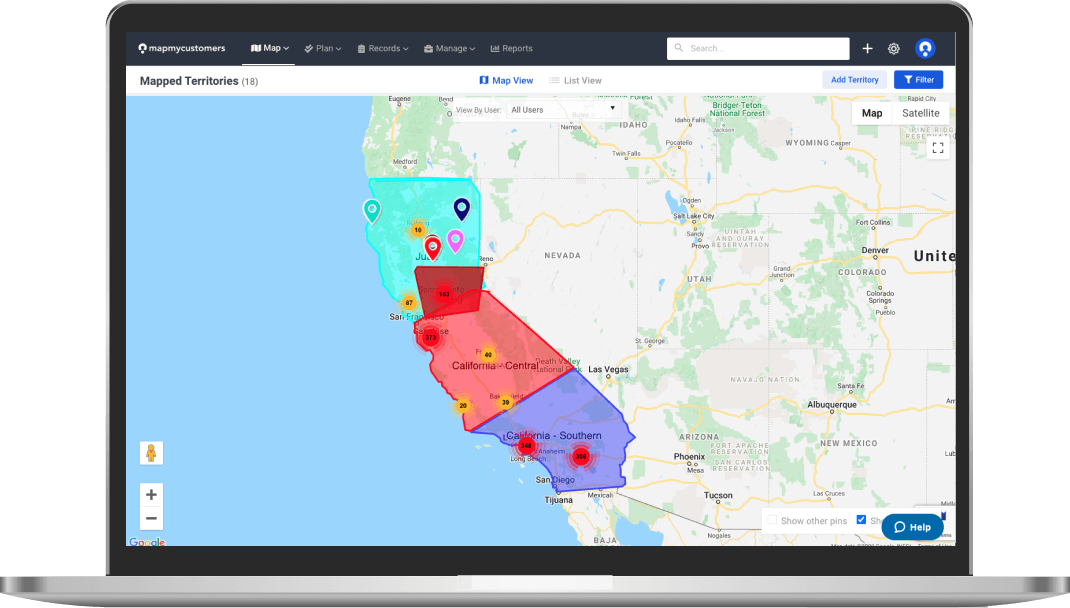
Map My Customers provides a drag-and-drop territory builder that makes it simple to create, adjust, and reassign territories. You can build territories by zip code, county, state, or custom boundaries, and the platform automatically calculates key metrics for each territory, like total accounts, pipeline value, and coverage gaps.
When a rep leaves or a territory needs rebalancing, you can make changes in minutes rather than hours. Reps only see the accounts in their assigned territory, which keeps the map clean and focused. Managers get a bird’s-eye view of all territories with color-coded overlays that highlight performance differences.
5. Reporting and Team Management
MapPoint had no reporting capabilities. If you wanted to analyze your data, you had to export it to Excel and build your own charts.
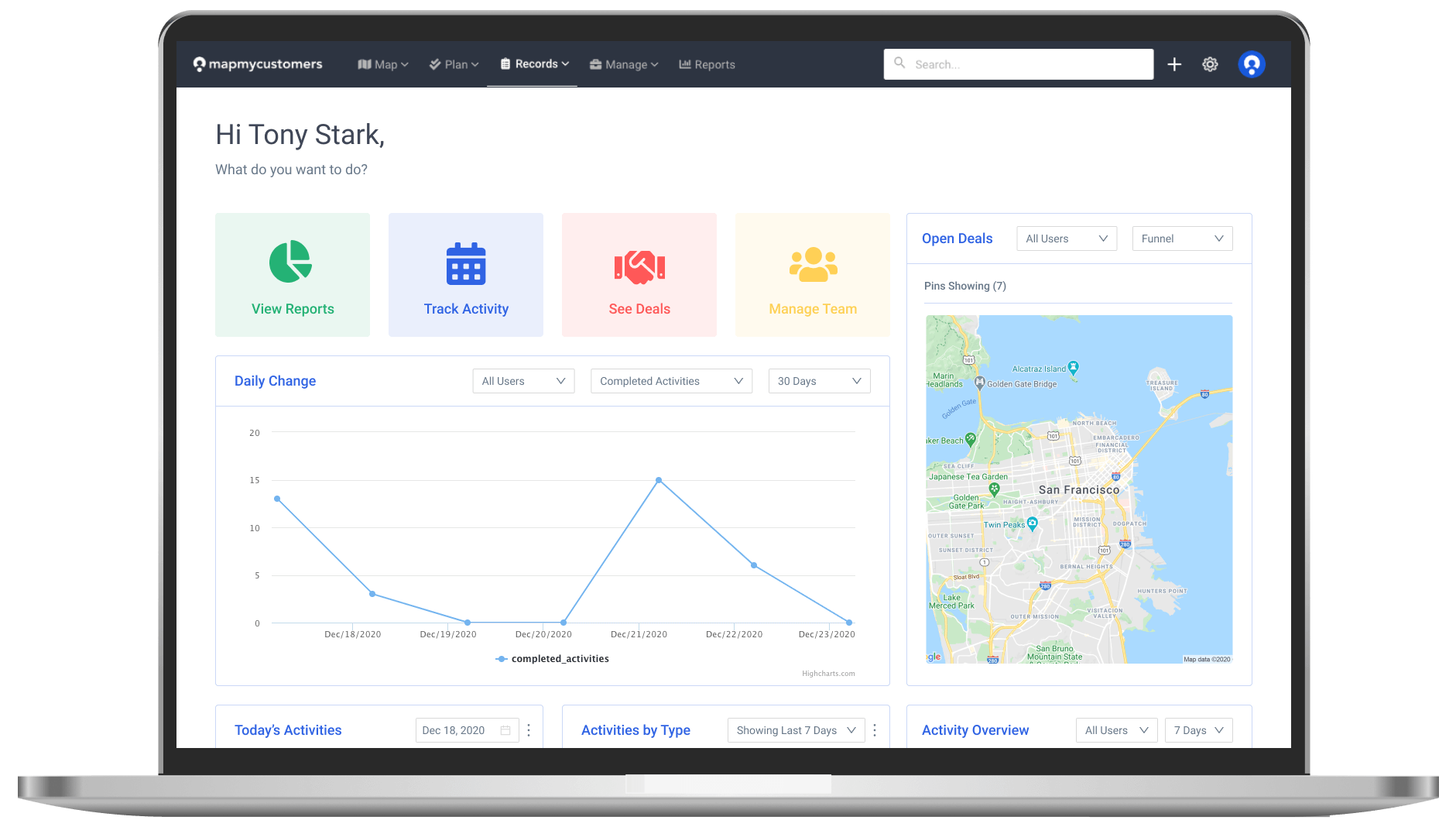
Map My Customers includes built-in dashboards and reporting tools designed specifically for field sales managers. Scorecards show rep-level performance at a glance, including visits completed, deals closed, pipeline generated, and quota attainment.
Team leaderboards create healthy competition and make it easy to identify top performers. Activity reports show exactly what each rep did during the week, with timestamps and GPS verification. Funnel reports track deals through every stage, so you can spot bottlenecks and forecast with confidence.
All reports update in real time, so you’re never working with stale data. You can also schedule automated report emails to stakeholders, saving hours of manual report building every week.
Making the Switch from MapPoint
If you’ve been holding onto MapPoint (or using a patchwork of spreadsheets and Google Maps to replace it), switching to Map My Customers is straightforward. The platform imports data from Excel, CSV files, or directly from your CRM. Most teams are up and running within a day.
Here’s what the transition typically looks like:
- Connect your CRM (Salesforce, HubSpot, Dynamics, or others) for automatic, bidirectional sync.
- Import your data. If you’re working from spreadsheets, upload your CSV and Map My Customers maps everything automatically.
- Set up territories. Use the territory builder to define boundaries and assign reps.
- Download the mobile app. Reps install the iOS or Android app and start planning routes immediately.
- Configure dashboards. Set up the reports and scorecards your managers need to coach effectively.
The Bottom Line
Microsoft MapPoint served field sales teams well for over a decade, but the world has moved on. Today’s field sales teams need real-time data, mobile access, CRM integration, route optimization, and performance analytics, none of which MapPoint can provide.
Map My Customers picks up exactly where MapPoint left off and delivers a platform built for the way modern field sales teams actually work. Whether you’re a solo rep planning your daily route or a VP of Sales managing 50 reps across the country, Map My Customers gives you the visibility, tools, and insights you need to sell more effectively.
Ready to see what a modern MapPoint alternative looks like? Book a demo today and see Map My Customers in action.